

Five reasons a new setting hasn’t reached your wireless sensor yet, most common first.
You change a sensor from reporting every 10 minutes to every 2. You save it. You wait for the next reading, and it still shows up 10 minutes after the last one. So you save it again.
This is one of the questions we see most often on our community forum, and the good news is that it usually means nothing is broken. It almost always comes down to one of five things. Start at the top.
First, the one idea that explains most of them. A battery powered sensor sends two different kinds of message:
- Data reports are the readings. They are a one way trip. The sensor transmits and goes back to sleep, and it is not listening while it sleeps.
- A configuration sync is a short window where the sensor is listening. It is the only moment the gateway can hand it a new setting.
That habit, sleeping almost all the time and listening only about once an hour, is a big part of how a sensor gets up to 5 years on a battery. It is also why settings wait. (Day One With a New Sensor walks through this on a real gateway, screen by screen.)
1. It hasn’t checked in yet
This is the answer most of the time. Newer sensors open their listening window once an hour. A setting you save at 9:02 does not land with the 9:12 reading. It lands at the next sync, up to an hour later.
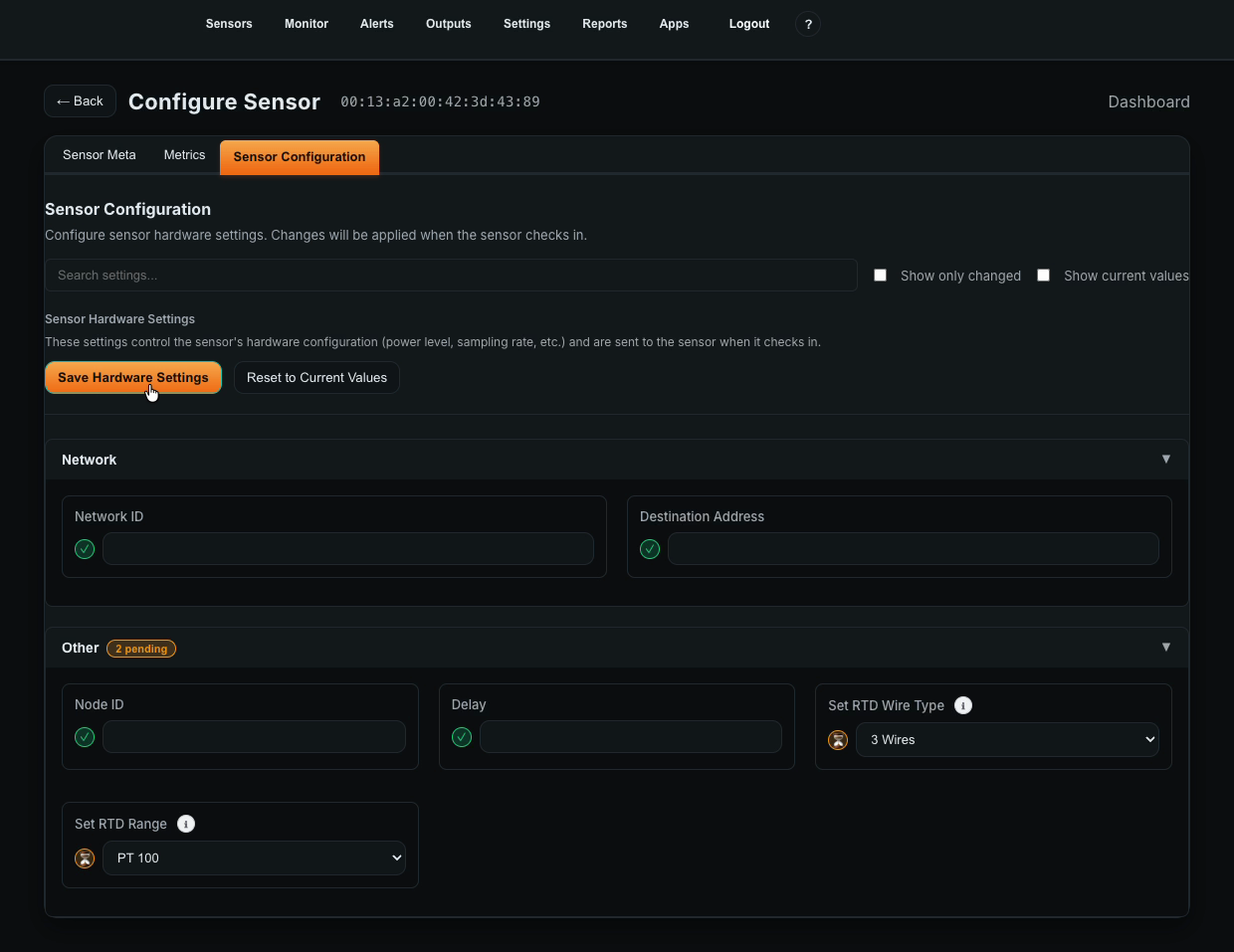
How to tell: in Atrium, the section you changed shows a pending badge until the sensor syncs. Once it clears, tick Show current values to read back what the sensor is actually running. If you configure through Node-RED, the hourly check-in shows up in the debug panel as a sync message, and a change that landed comes back as sync_response_success. (sync_response_skip means the sensor already had those settings.)
What to do: wait the hour, and don’t keep saving. Or, if you are standing next to the sensor, press and release its reset button (some sensors use a magnetic switch instead; the datasheet shows which). That puts it into configuration mode right away, and the queued settings land on the spot.
2. You changed the field that describes the sensor, not the one that controls it
Atrium has two numbers that both look like “how often does this sensor report,” and only one of them reaches the sensor.
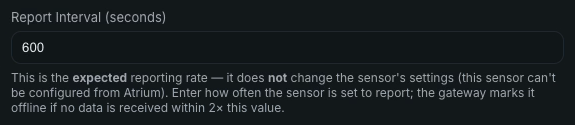
- Report Interval (on the Sensor Meta tab) is a description. The gateway uses it to decide when a quiet sensor counts as offline, after two missed reports. Changing it does not change how often the sensor transmits.
- Delay (on the Sensor Configuration tab) is the instruction. This is the one the sensor actually follows, and it rides the next sync like any other hardware setting.
If you changed the reporting rate, change both, and keep them matching. If Delay ever ends up more than twice the Report Interval, the gateway will start calling a healthy sensor offline.
The same split explains why some changes feel instant. The sensor’s name, location, asset and install date live only in Atrium and are never sent to the sensor, so they apply the moment you save. If those updated right away but your other change didn’t, you are looking at reason 1.
3. That sensor doesn’t sync on its own
Most of the catalog in service syncs by itself every hour, but not every sensor does yet. To check yours, look at the number Atrium prints in front of the sensor type. A sensor listed as 39 – RTD Temperature Sensor is type 39. Then find it in the list of sensor types that sync on their own, in step 4 of Day One With a New Sensor.
What to do: if your type isn’t on the list, the sensor has to be put into configuration mode by hand. That is usually an older, square-case sensor, and its user guide has the button steps.
4. Node-RED is sending the change to the wrong place
If you configure sensors from Node-RED on the Enterprise IIoT Gateway or an NCD modem, two setup mistakes stop a change from ever going out. Both came up in the same forum thread:
- The wrong serial port. Open the sensor’s Wireless Device node. On the gateway, both Serial Device and Serial Device for config should be set to
/dev/ttymxc2. (On a modem, pick the modem’s own config instead.) Then tick Auto Config, OTF Config and Wait for Network Formation, and the change goes out at the next sync without putting anything into configuration mode by hand. - A duplicate gateway connection. If the debug panel shows
TypeError: Cannot read properties of undefined (reading 'on'), open the menu, go to Configuration nodes, and look under ncd-gateway-config. There should be exactly one entry. Delete the extras, point any affected nodes back at the one that’s left, deploy, and restart Node-RED or the gateway.
The whole process, message by message, is in our Sync Configuration Process Guide for Node-RED.
5. The gateway was busy when the sensor listened
This one is fixed. Before Atrium 2.7.0, an installed app that kept polling a device the gateway couldn’t reach (an unplugged relay board, say) could tie up the radio long enough that the reply to a sensor arrived after it had gone back to sleep. In 2.7.0 the gateway backs off from a device that isn’t answering, and a sensor’s listening window takes priority.
What to do: if your gateway is on an older version, update it. The Atrium 2.7.0 post has the details.
The short version
- Wait up to an hour, or press the reset button if you are at the sensor.
- Change Delay, not just Report Interval, and keep the two matching.
- Check the sensor’s type number against the list of sensors that sync on their own.
- In Node-RED, use
/dev/ttymxc2on the gateway, tick all three config boxes, and keep exactly one gateway config. - Run Atrium 2.7.0 or later.
Still stuck? Post it on the community forum with the sensor’s type number and what you changed. The engineers who build these sensors answer there, usually the same day.